Dependency Rules
Introduction
Dependency rules determine which modules can access each other. Since managing dependencies on a per-module basis doesn't scale well, Sheriff utilizes tags to group modules together. Dependency rules are then defined based on these tags.
Each tag specifies a list of other tags it can access. To maintain clarity, it’s best practice to categorize tags into two groups: one for defining the module's domain/scope and another for defining the module's type.
For instance, if an application includes a customer domain and a holiday domain, these would define the domain tags.
A domain has different modules distinguished by type tags. For example, one module might contain smart components, another might have dumb components, and another might handle logic.
Domain tags could be domain:customer and domain:holiday. Type tags could be type:feature (for smart components),
type:ui (for dumb components), or type:data (for logic).
In this case, each module has both a domain tag and a type tag. For example, a module containing smart components for
customers would have domain:customer and type:feature. A module in the same domain but containing UI
components would have domain:customer and type:ui.
Dependency rules specify that a module tagged with domain:customer can only access modules with the same domain tag.
Additionally, a module tagged with type:feature can access modules tagged with type:ui and type:data.
When a module containing smart components needs to access a dumb component, Sheriff retrieves the tags for both modules. It then checks each tag of the smart component module to determine if it is permitted to access the corresponding tags of the dumb component module.
Since both modules share the same domain, access is allowed based on the domain tag. Additionally, because "type: feature" is allowed to access "type:ui", all tags are cleared, and access is granted.
Conversely, if a dumb component tries to access a smart component, access would be denied based on the type tag.
If a smart component from the customer domain tries to access a dumb component from another domain, access would be denied due to the domain tag.
Automatic Tagging
Sheriff automatically detects modules and assigns the noTag tag to them.
A directory is detected as a module when it matches a modules pattern or when it contains a barrel file. The second criterion means a stray index.ts can create a new noTag module and change which tags an import is checked against. Set moduleIdentity: 'config' to let the modules configuration alone define modules.
It assigns all files that aren't part of a module to the root module. The root module gets the root tag.
It's essential to set up the dependency rules. Specifically, the root tag (i.e., the root module) needs to access all modules tagged with noTag.
The depRules property in the sheriff.config.ts file defines the dependency rules. This property is an object literal where each key represents the tag of a module that wants to access another module. Its value specifies the tags it can access.
Initially, all modules can access each other, meaning that every noTag module can access other noTag modules.
The initial configuration from the CLI includes this setup.
Here’s an example configuration in sheriff.config.ts:
import { SheriffConfig } from '@lambda-solutions/sheriff-core';

export const sheriffConfig: SheriffConfig = {
  depRules: {
    root: 'noTag',
    noTag: ['noTag', 'root'],
  },
};
That is also the recommendation for existing projects because it allows an incremental integration of Sheriff.
For green-field projects, the manual tagging is the better option.
To disable automatic tagging, set autoTagging to false:
import { SheriffConfig } from '@lambda-solutions/sheriff-core';

export const sheriffConfig: SheriffConfig = {
  autoTagging: false,
  modules: {
    // see below...
  },
};
The root Tag
Given the following project structure:
src/app
├── main.ts
├── app.config.ts
├── app.component.ts
├── holidays
│   ├── data
│   │   ├── index.ts
│   │   ├── internal.service.ts
│   │   └── holidays-data.service.ts
│   ├── feature
│   │   ├── index.ts
│   │   └── holidays-facade.service.ts
│── core
│   ├── header.component.ts
│   ├── footer.component.ts
The directories src/app/holidays/data and src/app/holidays/feature are barrel modules. All other files are part of the root module, which is automatically tagged with root by Sheriff
This tagging of the root module cannot be changed. With disabled barrel-less mode (enableBarrelLess: false), which is the default, no module can access the root module.
The property excludeRoot can disable this behavior. By default. The best option, though, is to enable barrel-less mode which makes root a barrel-less module.
Manual Tagging
The modules property in the sheriff.config.ts defines barrel-less modules but also assigns tags to modules, regardless if barrel or barrel-less.
The keys of modules represent the module directories, and the corresponding values are the tags assigned to those modules.
The following snippet demonstrates a configuration where four directories are assigned both a domain and a module type:
import { SheriffConfig } from '@lambda-solutions/sheriff-core';

export const sheriffConfig: SheriffConfig = {
  modules: {
    'src/app/holidays/feature': ['domain:holidays', 'type:feature'],
    'src/app/holidays/data': ['domain:holidays', 'type:data'],
    'src/app/customers/feature': ['domain:customers', 'type:feature'],
    'src/app/customers/data': ['domain:customers', 'type:data'],
  },
  depRules: {},
};
domain:_ and type:_ define two dimensions for the whole project. The following rules should apply:
- A module can only depend on other modules of the same domain.
- A module tagged as
type:featurecan depend ontype:data, but the reverse is not allowed. - The
rootmodule can depend on modules tagged astype:feature. Since the root module only has theroottag, there is no need to include domain tags.
import { SheriffConfig } from '@lambda-solutions/sheriff-core';

export const sheriffConfig: SheriffConfig = {
  modules: {
    'src/app/holidays/feature': ['domain:holidays', 'type:feature'],
    'src/app/holidays/data': ['domain:holidays', 'type:data'],
    'src/app/customers/feature': ['domain:customers', 'type:feature'],
    'src/app/customers/data': ['domain:customers', 'type:data'],
  },
  depRules: {
    'domain:holidays': ['domain:holidays'], // Rule 1
    'domain:customers': ['domain:customers'], // Rule 1
    'type:feature': 'type:data', // Rule 2
    root: 'type:feature', // Rule 3
  },
};
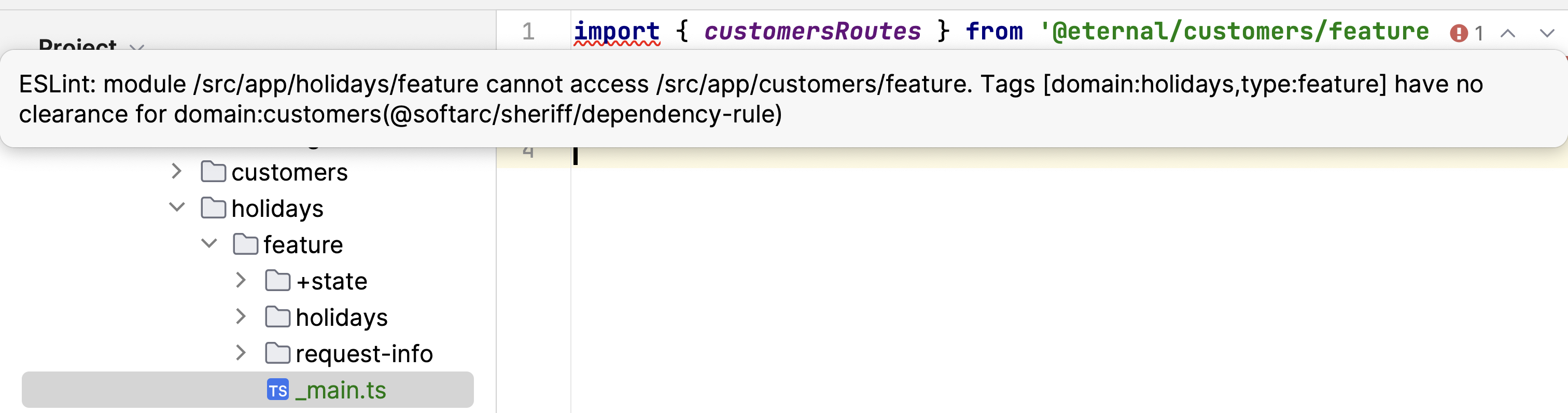
If these rules are violated, a linting error will be triggered:
If only the modules within the director "holidays" should get tags, and the other modules should be auto-tagged, i.e. noTag, the configuration would look like this:
import { SheriffConfig } from '@lambda-solutions/sheriff-core';

export const sheriffConfig: SheriffConfig = {
  modules: {
    'src/app/holidays/feature': ['domain:holidays', 'type:feature'],
    'src/app/holidays/data': ['domain:holidays', 'type:data'],
  },
  depRules: {
    'domain:holidays': ['domain:holidays', 'noTag'],
    'type:feature': ['type:data', 'noTag'],
    root: ['type:feature', 'noTag'],
    noTag: ['noTag', 'root'],
  },
};
Note: This setup allows any module from domain:holidays to depend on modules within the customers directory, but the reverse is not permitted.
Nested Paths
Nested paths simplify the configuration. Multiple levels are allowed.
import { SheriffConfig } from '@lambda-solutions/sheriff-core';

export const sheriffConfig: SheriffConfig = {
  modules: {
    'src/app': {
      holidays: {
        feature: ['domain:holidays', 'type:feature'],
        data: ['domain:holidays', 'type:data'],
      },
      customers: {
        feature: ['domain:customers', 'type:feature'],
        data: ['domain:customers', 'type:data'],
      },
    },
  },
  depRules: {
    'domain:holidays': ['domain:holidays'],
    'domain:customers': ['domain:customers'],
    'type:feature': 'type:data',
    root: ['type:feature'],
  },
};
Placeholders
Placeholders help with repeating patterns. They have the syntax <name>, where name is the placeholder name.
import { SheriffConfig } from '@lambda-solutions/sheriff-core';

export const sheriffConfig: SheriffConfig = {
  modules: {
    'src/app': {
      holidays: {
        '<type>': ['domain:holidays', 'type:<type>'],
      },
      customers: {
        '<type>': ['domain:customers', 'type:<type>'],
      },
    },
  },
  depRules: {
    'domain:holidays': ['domain:holidays'],
    'domain:customers': ['domain:customers'],
    'type:feature': 'type:data',
    root: ['type:feature'],
  },
};
Placeholders are available on all levels. The configuration could therefore further be improved.
import { SheriffConfig } from '@lambda-solutions/sheriff-core';

export const sheriffConfig: SheriffConfig = {
  modules: {
    'src/app/<domain>/<type>': ['domain:<domain>', 'type:<type>'],
  },
  depRules: {
    'domain:holidays': ['domain:holidays'],
    'domain:customers': ['domain:customers'],
    'type:feature': 'type:data',
    root: ['type:feature'],
  },
};
Recursive Globs (**)
All matchers above span a fixed number of directory segments: *,
<placeholder> and /regex/ each match exactly one segment. In workspaces
where modules live at varying depths, every depth would need its own key. A
** segment closes that gap: it matches zero or more directory segments.
import { SheriffConfig } from '@lambda-solutions/sheriff-core';

export const sheriffConfig: SheriffConfig = {
  modules: {
    // feature modules at any depth below libs
    'libs/**/feature-<name>': ['type:feature', 'feature:<name>'],
    // api modules at any depth, tagged with their parent domain
    'libs/**/<domain>/api': ['type:api', 'domain:<domain>'],
  },
  depRules: {
    'type:feature': 'type:api',
    'domain:*': ({ from, to }) => from === to,
    root: '*',
  },
};
The rules for **:
**must be a complete segment. Inside a segment (feat**) the*characters keep their single-segment wildcard meaning.**matches zero segments too:libs/**/apialso matcheslibs/api.**never captures a placeholder;<domain>still matches exactly one segment.- A trailing
**makes every directory below (and including) the prefix a module:'src/**'is the explicit "every folder is a module" setup. - Directory discovery driven purely by
**skipsnode_modulesand dot-directories (such as.git). An explicit segment ('node_modules/<pkg>') still matches them. - Key order still decides between overlapping keys: the first matching key
wins, so place more specific keys before their
**counterparts. - For file-level
exports, a pattern without**always outranks a pattern with**when both match the same module.
denyRules
Use denyRules when a tag must restrict dependencies even if depRules would
otherwise allow them. Sheriff evaluates denyRules after depRules, and a
matching deny rule always wins over an allow rule.
import { SheriffConfig } from '@lambda-solutions/sheriff-core';

export const sheriffConfig: SheriffConfig = {
  modules: {
    'src/domain': ['domain:booking', 'type:domain'],
    'src/shared': ['shared'],
  },
  depRules: {
    '*': 'shared',
    'domain:*': 'shared',
    'type:domain': 'type:domain',
  },
  denyRules: {
    'type:domain': ({ to }) => to !== 'type:domain',
  },
};
With this configuration, src/domain cannot import src/shared. The dependency
first receives clearance from depRules, then denyRules rejects it because the
importing module has type:domain and the target does not.
denyRules do not grant access. If depRules do not allow an import,
denyRules cannot make it valid. A source tag without a matching denyRules
entry is normal and does not raise a missing-rule error.
externalRules
externalRules restrict imports from external libraries in node_modules.
The keys match the importing module's tags, while each value is an allow-list
of library patterns:
import { SheriffConfig } from '@lambda-solutions/sheriff-core';

export const sheriffConfig: SheriffConfig = {
  modules: {
    'src/domain': ['type:domain'],
    'src/api': ['type:api'],
    'src/infra': ['type:infra'],
  },
  depRules: {
    '*': '*',
  },
  externalRules: {
    'type:domain': [],
    'type:api': ['@angular/core'],
    'type:infra': ['@angular/*', 'rxjs'],
  },
};
Sheriff matches library wildcards against the full import string. An exact
@angular/core pattern therefore does not allow @angular/core/testing, while
@angular/* allows both. Rule keys are wildcard-aware as well, so type:*
can govern every type tag.
Every matching restriction must allow the import. This gives modules carrying
multiple tags AND semantics: if one matching tag allows a library and another
matching tag rejects it, Sheriff reports the vetoing tag. An empty array
rejects all external libraries. A tag for which no key matches is unrestricted,
so omitting externalRules preserves the previous behavior.
If TypeScript cannot resolve a bare package import, Sheriff also checks the
nearest package.json up to the project root. Packages declared in
dependencies, peerDependencies, or optionalDependencies are still
governed by externalRules even when they are not installed. Undeclared,
unresolvable imports remain unresolvable and are not checked as externals.
A tsconfig path alias that matches but fails to resolve also falls into this
fallback; when the same name is declared in package.json, as with workspace
packages, Sheriff treats it as external. Manifest reads are cached for one
Sheriff run.
A matcher function can make the decision from the full external import and the importing module context:
externalRules: {
  'type:api': ({ externalLibrary, from }) =>
    externalLibrary === '@angular/core' && from === 'type:api',
}
depRules Functions & Wildcards
depRules allows functions instead of static values. The names of the tags can include wildcards:
import { SheriffConfig } from '@lambda-solutions/sheriff-core';

export const sheriffConfig: SheriffConfig = {
  modules: {
    'src/app/<domain>/<type>': ['domain:<domain>', 'type:<type>'],
  },
  depRules: {
    'domain:*': ({ from, to }) => from === to,
    'type:feature': 'type:data',
    root: ['type:feature'],
  },
};
or use sameTag, which is a pre-defined function.
import { sameTag, SheriffConfig } from '@lambda-solutions/sheriff-core';

export const sheriffConfig: SheriffConfig = {
  modules: {
    'src/app/<domain>/<type>': ['domain:<domain>', 'type:<type>'],
  },
  depRules: {
    'domain:*': [sameTag, 'shared'],
    'type:feature': 'type:data',
    root: ['type:feature'],
  },
};
The Rule Context
A depRules matcher function receives one object:
| Property | Type | Meaning |
|---|---|---|
from | string | The single source tag currently being evaluated |
to | string | The single target tag currently being evaluated |
fromTags | string[] | All tags of the importing module |
toTags | string[] | All tags of the imported module |
fromModulePath | string | Path of the importing module |
toModulePath | string | Path of the imported module |
fromFilePath | string | Path of the importing file |
toFilePath | string | Path of the imported file |
from and to are a single tag each, because Sheriff evaluates every
source/target tag combination separately (see
How Multiple depRules Match). fromTags and
toTags give the full picture, which is what you need for marker tags — asking
"does the target also carry port?" is impossible with to alone:
depRules: {
  // A feature may reach another feature only through its public port.
  'feature:*': [sameTag, ({ toTags }) => toTags.includes('port')],

  // `type:feature` is carried by both a slice root and every `feat-<x>/`
  // folder. Only the slice root wires the implementation; `entry` tells them
  // apart without re-deriving module identity from the file path.
  'type:feature': ({ to, fromTags }) =>
    to.startsWith('type:') && (to !== 'type:infra' || fromTags.includes('entry')),
}
An externalRules matcher gets a smaller context: from, fromTags,
fromModulePath, fromFilePath and externalLibrary.
fromTags and toTags are fork-onlyThese two properties do not exist in upstream
@softarc/sheriff-core,
whose rule context is limited to fromModulePath, toModulePath,
fromFilePath and toFilePath.
This matters because the degradation is silent rather than loud. On upstream the
properties are undefined, so a guard like
to !== 'type:infra' || fromTags?.includes('entry') does not throw — it
collapses to permanently true, and the rule keeps reporting success while
enforcing nothing. A rule can therefore pass its tests against this fork and
allow everything upstream.
If your config must run against both, avoid these two properties, or assert their presence explicitly at the top of the rule so a missing context fails loudly instead of silently.
How Multiple depRules Match
When Sheriff checks an import, every source tag of the importing module must have clearance. Source tags are therefore combined with AND.
For a single source tag, however, multiple depRules keys can match. Sheriff
evaluates all matching keys until a rule value returns true; those matches are
combined with OR, and the first true wins. Target tags are also checked as
alternatives: a source tag has clearance when it can access any tag of the
imported module.
This matters for modules with several tags. A permissive wildcard rule can grant clearance even if a more specific rule would not:
import { noDependencies, SheriffConfig } from '@lambda-solutions/sheriff-core';

export const sheriffConfig: SheriffConfig = {
  modules: {
    'src/domain': ['domain:booking', 'type:domain'],
    'src/shared': ['shared'],
  },
  depRules: {
    '*': 'shared',
    'domain:*': 'shared',
    'type:domain': noDependencies,
  },
};
In this configuration, src/domain may import src/shared. The domain:booking
source tag has clearance through * and domain:*. The type:domain source tag
also has clearance because * matches it and allows shared; noDependencies
does not make the module stricter because depRules only grant clearance, they
do not subtract it.
Use denyRules when a tag must veto dependencies that another
matching depRules key would allow.